Controlling Node Text Alignment in Mindmup
You can now control node text alignment in Mindmup maps. This makes longer text easier to read and lets you create nodes with neatly aligned bullet-point lists.
How to Align Nodes
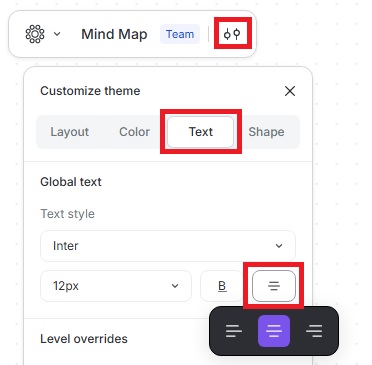
- Click the Customize theme icon.
- Go to Text and select the Alignment icon.
- Choose your preferred alignment for the node text.
Keyboard Shortcuts
- Ctrl (Cmd on macOS) + Shift + L — Left alignment
- Ctrl (Cmd on macOS) + Shift + R — Right alignment
- Ctrl (Cmd on macOS) + Shift + E — Center alignment
Default Alignment in Themes
Themes that usually include a lot of text now automatically use left or right alignment based on text direction, including the Productive theme and Argument mapping mode. Nodes in standard Mindmup themes remain center-aligned by default.