Linked Submaps
You can split large maps into linked submaps to keep complex ideas easier to manage and navigate.
Linked submaps let you carve out a section of a larger map and turn it into a separate, connected map—without breaking context.
Extracting a submap
To carve out part of a larger map and turn it into a separate map:
- Click the node you want to extract.
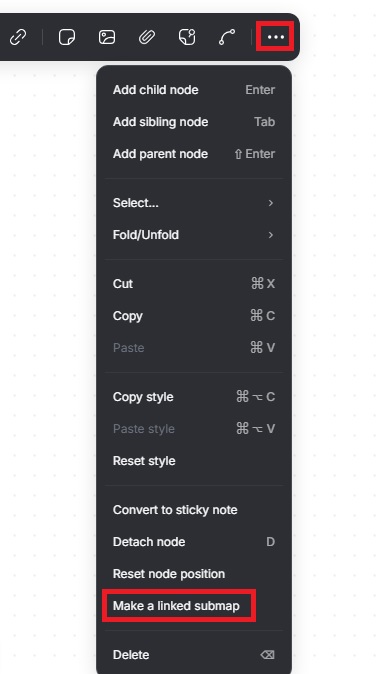
- Click the three dots on the pop up menu.
- Select Make a linked submap.
Mindmup creates a new map from the selected node and replaces that node with a link to the new submap.
Opening the submap
To open a submap, click the link shown in the node on the main map. The linked submap opens and is ready for editing.
Limitations
- Only map owners can create linked submaps. The option is not available to collaborators or users with read-only access.
- Linked submaps do not automatically inherit sharing settings. If the original map is shared, you’ll need to share the submap separately.
- This feature is available when working directly in the Mindmup web app. It is not available inside third-party integrations.