Extracting Multiple Submaps
You can split complex maps into multiple linked submaps in one step. This makes it much easier to manage large structures and reorganize information without losing context.
Instead of extracting one node at a time, Mindmup lets you select multiple nodes and convert them into separate submaps in a single action.
Extracting multiple submaps
For example, to move all branches starting at the third level into their own submaps:
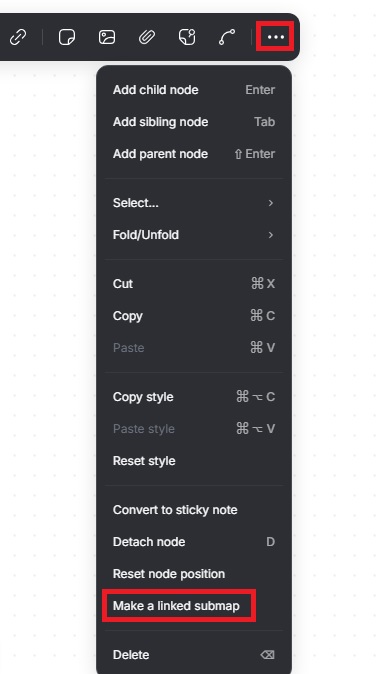
- Press the 3 key on your keyboard to activate all third-level nodes.
- Click the three dots on the pop up menu.
- Click Make a linked submap.
Mindmup creates individual maps for each selected node, moves the content of each subtree into its own map, and replaces the original nodes with links to the new submaps.
Limitations
Linked submaps do not automatically inherit sharing settings. If the original map is shared, you’ll need to share each submap separately.
This feature is still evolving, and additional use cases will be supported in future updates.