Fold all nodes in large maps
When working with very large maps containing thousands of nodes, visual updates can take longer on less powerful computers. Folding all nodes helps improve performance by hiding everything below the root nodes, so you can focus on a smaller part of the map at a time.
Once everything is folded, you can gradually open individual nodes or entire levels as needed, making large maps easier and faster to work with.
Fold all nodes
- Click the Mindmup icon in the top-left menu.
- Go to View › Fold/Unfold › Fold all nodes.
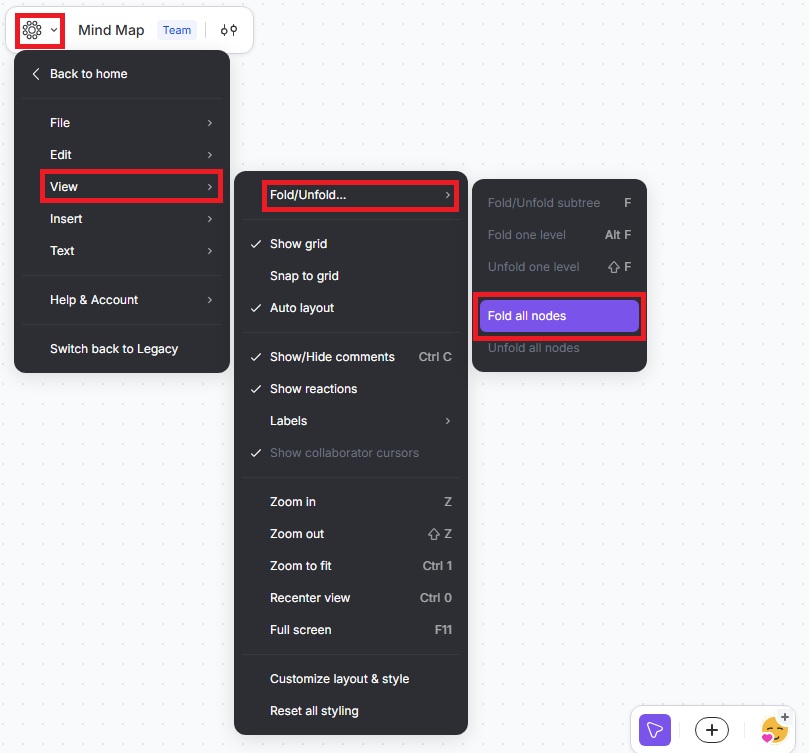
Open nodes gradually
After folding all nodes, you can reveal content step by step using other options in the same menu:
- View › Fold/Unfold › Fold/Unfold subtree
- View › Fold/Unfold › Unfold one level
This approach lets you control how much of the map is visible while working, which is especially helpful for complex or large maps.
If you have questions or feedback, contact us at contact@mindmup.com.