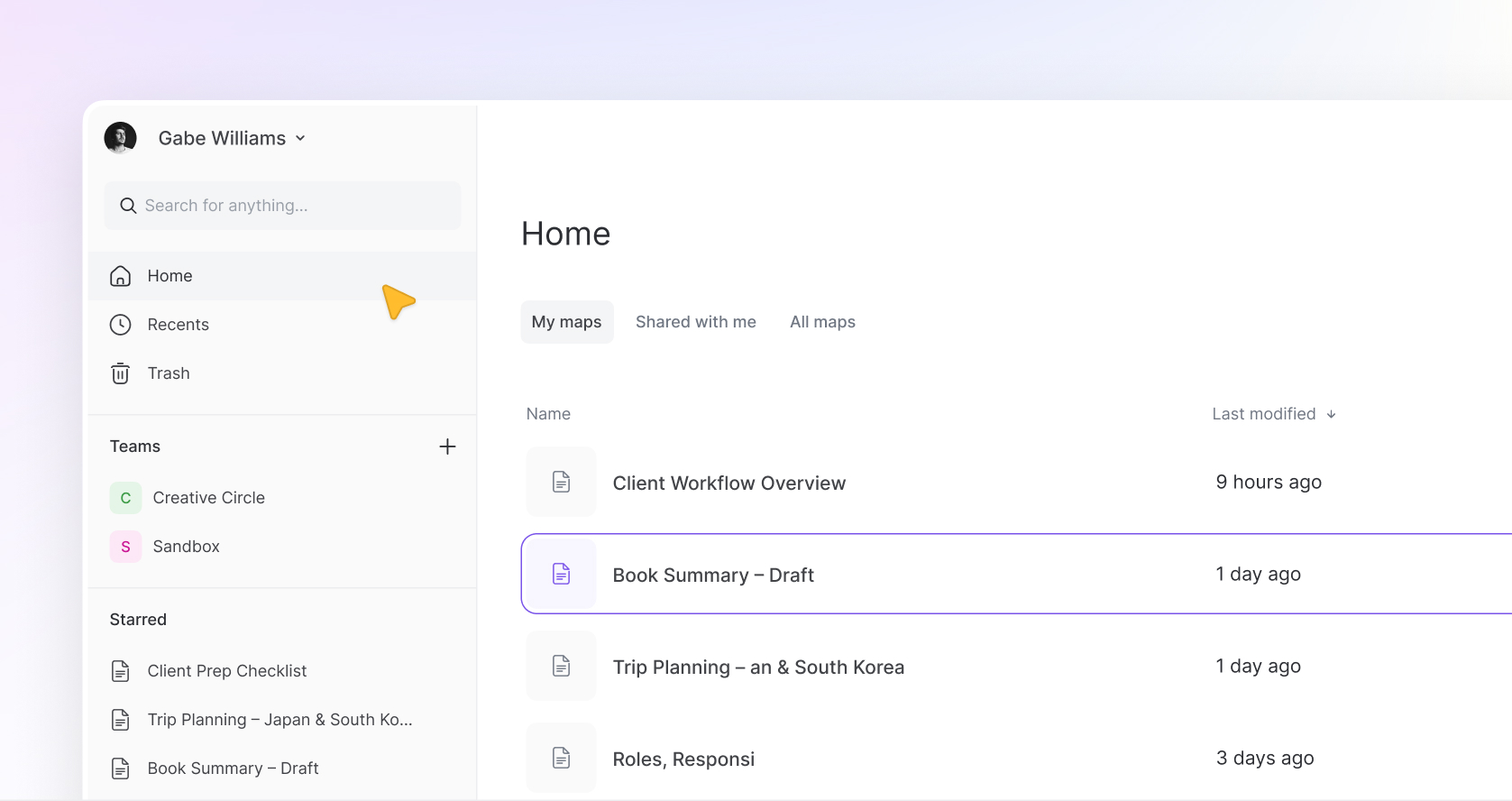
Mindmup 3 represents a significant step forward in how the product feels and what it can do.
This page is a complete overview of everything available today, along with the improvements that make the experience faster, more flexible, and easier to work with.
Mind maps
Mind mapping is at the core of everything, and this is where the biggest improvements are felt. Maps are smoother, faster, and far less rigid than before. You can move around the canvas more freely, restructure ideas without friction, and build larger maps without things feeling cramped or messy. Smart layouts keep everything organized as you go, so the map stays clean without constant adjustments. The overall experience feels more modern, more fluid, and much easier to work in for longer sessions.
Map presets
Instead of starting from scratch every time, you can choose between different map types like standard mind maps, org charts, and argument maps. You can also switch between these types at any point, which makes it easy to change how your ideas are structured without rebuilding everything.
Styling and customization
Customization is much more flexible now. You can style your entire map, specific levels, individual nodes, or even connection lines and text independently. Colors, borders, shapes, typography, and spacing are all adjustable. It gives you a lot of control without making things complicated, whether you want something minimal or highly detailed.
Presentation mode (coming soon)
Presentation mode will allow you to turn any map into a structured, dynamic presentation in one click. Instead of recreating content elsewhere, you’ll be able to present directly from your map in a way that flows naturally from your thinking.
Notes
Notes now support rich text, which makes them far more useful for capturing detailed information. You can format text, structure content, and add depth behind each node without cluttering the map itself.
Sticky notes
Sticky notes are now available across all map types and are much more flexible. They can be attached to nodes or placed freely on the canvas, styled however you want, and used for quick ideas, annotations, or grouping concepts visually.
Map sharing
Sharing has been simplified significantly. You can share maps with anyone, whether they have a Mindmup account or not, and assign different roles and permissions. Maps can be shared with individuals or entire teams in bulk, and access follows roles automatically, which removes a lot of manual setup.
Publish interactive maps
You can publish maps as optimized, interactive web pages. These are designed to load quickly and be easy to explore, making them ideal for embedding on websites, sharing on social platforms, or presenting ideas externally.
Tagging system
Tags are more dynamic and easier to work with. You’ll only see tags that are relevant to your current view, which keeps things clean. You can create new tags as needed and use them to organize maps and files more effectively.
Sequence labels
There are multiple types of sequence labels that can be enabled or disabled depending on your needs. This gives you flexibility in how you present structure, whether it’s simple numbering or more complex hierarchies.
Advanced search
Search is powerful enough to find not just maps, but specific nodes within maps. Even large collections of work remain easy to navigate because you can quickly jump to exactly what you’re looking for.
Keyboard shortcuts
There are a wide range of shortcuts designed to speed up your workflow. New controls for panning, zooming, dragging, and editing make the experience much smoother, especially for power users who rely on speed.
Argument Visualization mode
Argument maps are fully supported with a dedicated structure. You have a high level of control over how they look and behave, making it much easier to build clear, structured reasoning without extra effort.
Image attachments
Images can be added directly to nodes and customized to fit your layout. You can adjust size and positioning so they integrate naturally into your map instead of feeling like an afterthought.
File attachments
Any type of file can be attached to nodes, keeping supporting materials connected to the ideas they belong to.
Advanced and high-resolution exports
Exports are flexible and high quality. You can export maps as images, PDFs, Mindmup files, or structured outlines, including formats suitable for tools like Microsoft Word. This makes it easy to reuse your work in different contexts.
Version history
Every change is tracked, allowing you to revisit and restore previous versions. This makes it easier to experiment without worrying about losing work.
Restore deleted maps
Deleted maps can be recovered within 30 days, giving you a safety net for mistakes.
Manual backup and restore
You can export maps as Mindmup files or keep local copies, host them yourself, and reimport them later. The full structure of the map is preserved, giving you full control over your data.
Teamspaces
Teamspaces make it easier to organize work across teams or projects. Maps can be grouped, shared, and managed in dedicated spaces that appear in your sidebar, making navigation and collaboration more structured.
Share across teams
Maps can be shared with entire teams instantly, which simplifies collaboration at scale.
Guest Pass mode
Guest Pass allows you to share a map with anyone, even if they don’t have an account. You can give view or edit access, set time limits, and even protect access with a password. It’s especially useful for classrooms, workshops, or quick collaboration.
Multiple admins
Team and organization accounts can have multiple admins, making it easier to manage users, permissions, and team structures without relying on a single person.
SSO with Google and Microsoft
Signing in is quick and secure using existing accounts, which removes friction and simplifies access.
Google Drive integration
Mindmup integrates directly with Google Drive through its dedicated app, allowing you to store, manage, and access maps within your existing workflow.
Domain-restricted sharing
Sharing can be limited to specific domains, helping organizations keep access controlled.
Advanced security settings
Permissions, roles, and access can be configured in detail, giving you the control needed for both small teams and larger organizations.
What’s Still to Come
Mindmup 3 is just the foundation.
- AI will be introduced in a way that supports your thinking, not replaces it. You’ll be able to generate structured maps from prompts, expand ideas, and refine content quickly. The focus is on helping you move faster when you need it, while still keeping full control over your work.
- Presentation mode will continue to evolve into a more complete way to communicate ideas directly from your maps.
- A full desktop app will bring the same experience offline.
- Comments and discussions will make collaboration more natural inside maps.
- Real-time collaboration will continue to improve, making shared editing faster and more seamless.
Pricing and Value
Mindmup pricing has evolved alongside the product.
At the same time, the goal remains the same.
To offer a product that delivers strong capability and flexibility without the overhead and cost found in many other tools.
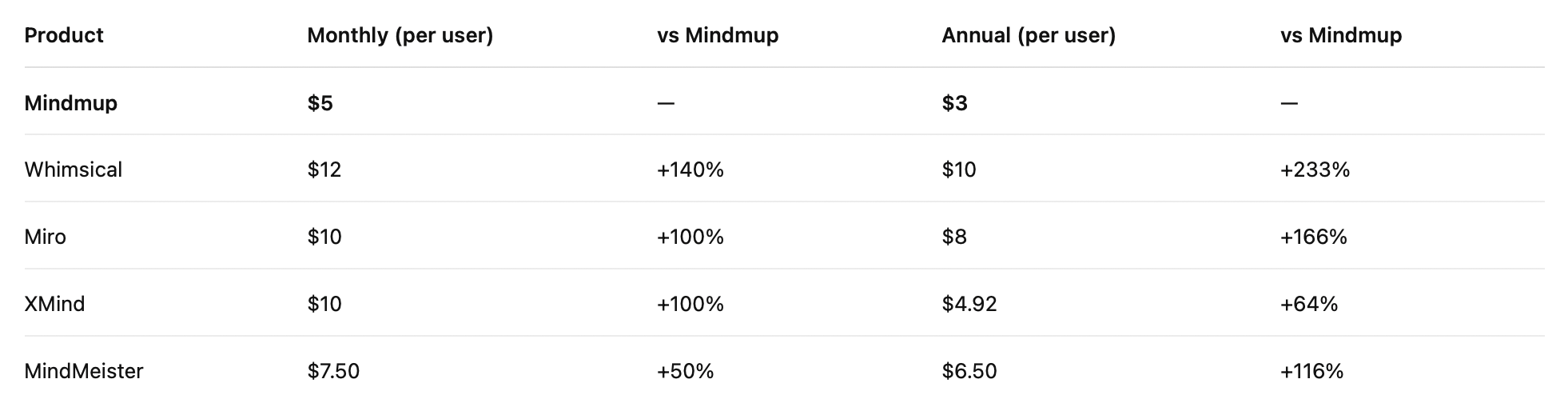
Even with the updates, Mindmup remains one of the more cost-efficient options available, especially when you consider the flexibility and range of features included.
Looking Ahead
Mindmup continues to focus on one thing.
Providing a clear, flexible space to think.
With the new foundation in place, it’s now possible to keep improving that experience in ways that feel natural, without adding unnecessary complexity.