Mindmup Atlas makes it simple to share your mind maps with a wider audience when you want to publish rather than co-create.
Mindmup Atlas is an online mind map library that lets you publish interactive, read-only versions of your maps. These maps are optimized for social networks, embedding on websites, and search engine indexing. With just a few clicks, you can share your ideas and engage your readers using interactive maps. Atlas serves your content securely and quickly via a global content delivery network, or you can download your maps and host them on your own site.
Engage Your Audience with Interactive Maps
Instead of sharing a static image or PDF, publish interactive maps that your audience can explore. Large maps remain easy to navigate by collapsing nodes, and readers can expand them as needed. You can link content to articles and resources online, and your readers can access them with a single click. Attach rich-text content to your ideas, so readers can view details instantly.
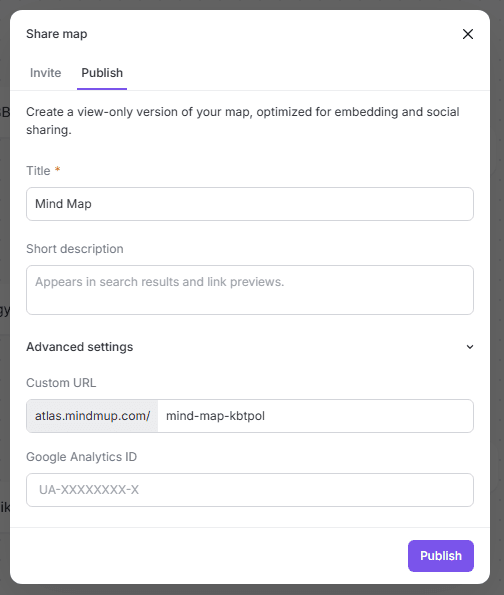
To get started:
- Click Share › Publish in the top-right corner of the Mindmup web app, or
- Select File › Share/Publish from the main menu.
Add a title, a short description, and adjust advanced settings to customize your map’s URL.

Share Maps Easily and Securely
Viewers have read-only access, so you don’t need to manage permissions or worry about security. They’ll see a clean interface that lets them focus on your content without distractions.
Maps are delivered worldwide through a content delivery network, ensuring fast load times wherever your audience is. All content is served over HTTPS, protecting it from tampering on public networks or by third parties.
Mindmup also makes it easy to post your maps to social networks and link-sharing sites with a single click.
Get Visibility on Social Networks
Publishing to social networks is hassle-free. Mindmup automatically adds images and contextual info so your maps display well on Twitter, Facebook, LinkedIn, Pinterest, and other platforms. Thumbnails are generated automatically for sites that support them.
Integrate Maps into Your Blog or Website
When you publish a map, you can embed it on your site or blog as an iframe. This works with Google Sites, Blogger, and other platforms.
You can also download the map as a self-contained HTML file to host it yourself, modify the page, add widgets, and publish under your own domain. Thumbnails are generated for sites that don’t support embedding.
Maps adapt to users’ browsers:
- Very old browsers show a static image.
- Browsers with limited interactivity show a static HTML page with basic navigation.
- Modern browsers allow full interactive exploration.
Republishing Maps
Atlas uses a global content distribution network, so maps are cached near your readers for fast loading.
When you republish a map, updates may take up to 30 minutes to appear worldwide. Newly published maps appear immediately.
To bypass caching delays, you can publish the map under a different URL by changing the URL slug. Note that the original version remains online, so you’ll have two versions available.
Restricting Atlas Usage for Organizational Accounts
Some organizations, like schools, may want to limit publishing. Administrators can choose whether users can access Mindmup Atlas via the Account page.
This setting is available to all Team and Organization Mindmup accounts.