Add or remove tags
Tags help you organize and quickly find your maps. You can add, remove, or update tags at any time while editing a map.
Manage tags while editing a map
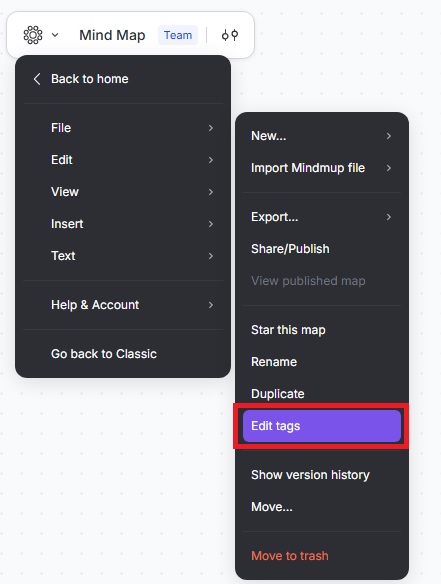
While editing a map, click the Mindmup icon › File › Edit tags.
From the dialog:
- Create a new tag, or
- Tick the checkboxes next to existing tags to assign them to the map.
Changes are saved immediately.
Manage tags from the Mindmup Home page
- Open the Mindmup Home page.
- Click on the three dots next to a map.
- Select File › Edit tags.
Use the dialog to add new tags or assign existing ones.
Find maps with a tag
- Open the Mindmup Home page.
- Click All tags to view the list of available tags.
- Click a tag to show only maps with that tag.
- Click an additional tag to further narrow the list and show maps that match both tags.
To return to viewing all maps, click All tags again.
